

CUDA support and smarter multi-core scores.
Primate Labs just shipped a real Geekbench overhaul, and the changes go well past a version bump. Geekbench 7 rethinks how multi-core scores get measured, adds machine learning and content-creation workloads to the GPU test, and finally supports Nvidia’s CUDA API alongside OpenCL, Vulkan, and Metal. We walk through what changed, why the new multi-core methodology matters for anyone comparing real devices, and how Geekbench AI rounds out the picture for teams evaluating CPU, GPU, and NPU performance side by side.

Primate Labs released Geekbench 7, and it’s a substantial overhaul of the benchmark suite. The update runs on Android, iOS, Windows, macOS, and Linux, stays free for personal use, and adds a Pro tier at 20% off through August 6. The changes touch every major test in the suite: CPU, GPU, multi-core methodology, and dataset size.
The multi-core benchmark got a genuine rework. Earlier versions forced every workload into multi-threaded mode regardless of how the real application actually behaves, which distorts scores without telling anyone anything useful. Geekbench 7 fixes that: A workload only runs multi-threaded if the task it models genuinely runs multi-threaded in the real world. The HTML5 Browser test drops out of the multi-core suite entirely, since browsers run single-threaded or lightly-threaded in practice. The result is a multi-core score that tracks what a device actually does for real workloads, not what a synthetic benchmark can theoretically extract from every available core.
New media workloads target the tasks that dominate everyday CPU use. Geekbench 7 encodes screen-sharing video with the AV1 codec, modeling videoconferencing screen shares. It compresses music and spoken-word audio with the Opus codec, modeling voice memo and podcast apps. It decodes audio and video and generates live captions through OpenAI’s Whisper speech-recognition model, modeling video playback with automatic subtitles. A new Game Physics workload runs on the Jolt Physics engine used in modern games. The Photo Editor workload gained a richer set of real-world edits, and Photo Library now imports and processes JPEG XL and DNG formats.
The GPU benchmark shifted focus toward machine learning and content creation, the workloads that increasingly define real GPU use. New ML tests track faces and apply real-time filters, modeling social media apps; upscale images with machine learning, modeling super-resolution features in content-creation tools; and blur video backgrounds, modeling videoconferencing virtual backgrounds. Geekbench 7 also adds RAW image processing, LUT-based color grading, path tracing, and fluid simulation to the GPU suite. CUDA joins OpenCL, Vulkan, and Metal as a supported API, letting anyone measure an Nvidia GPU using the same API that runs its heaviest workloads, a request Primate Labs had fielded for years.
Dataset sizes grew across the board to match how people actually use their devices today. File Compression now spans a wider mix of source code, object code, and text-document archives. PDF Viewer processes everything from park maps to technical documents to academic papers. Developer and image-processing workloads gained more assets and additional formats throughout. Primate Labs pairs Geekbench 7 with a companion tool, Geekbench AI, which runs 10 AI workloads across three data types—Single Precision, Half Precision, and Quantized—letting anyone test CPU, GPU, or a device’s dedicated NPU separately, across whatever framework the hardware supports, from Core ML to QNN, then compare results across Android, iOS, Windows, macOS, and Linux in one browser.
Together, the two tools give ISVs and silicon teams a single reference point for CPU, GPU, and NPU performance claims that used to require three separate benchmarks and three separate vendors’ marketing numbers to approximate.
None of this changes what Geekbench actually is: a synthetic benchmark, not a guarantee of real-world performance on any specific workload. What it does change is how honestly that synthetic number maps to real use, and for procurement teams comparing a stack of vendor spec sheets, that mapping is the entire point of running a benchmark in the first place.
Our results
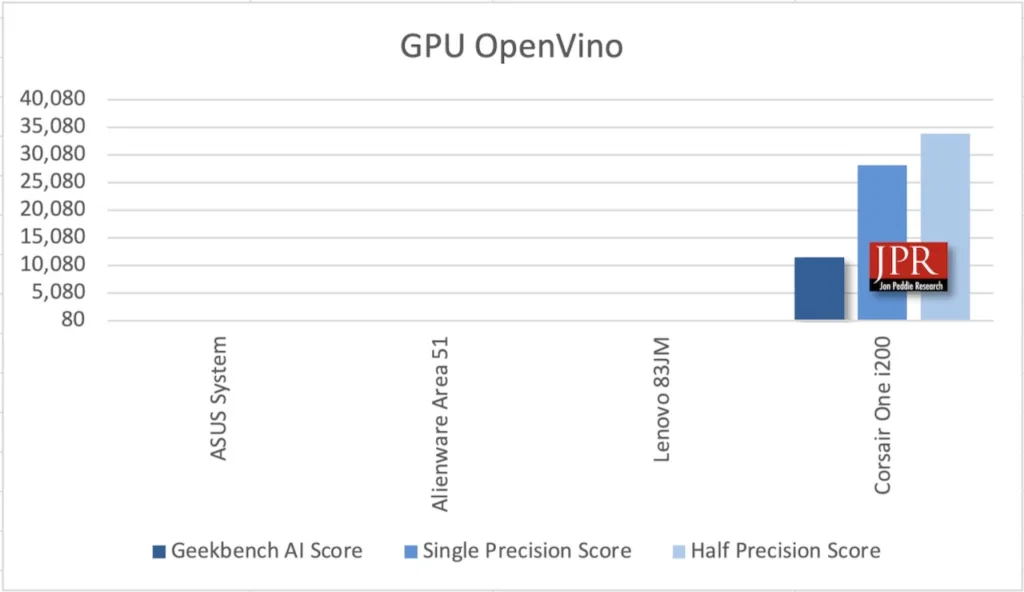
We ran the benchmark on very different machines: Asus System, Alienware Area 51, Lenovo 83JM, and Corsair One i200. As a result, we couldn’t get consistent GPU tests to run all four systems, but we could get consistent CPU tests to run. The following charts tell the story.
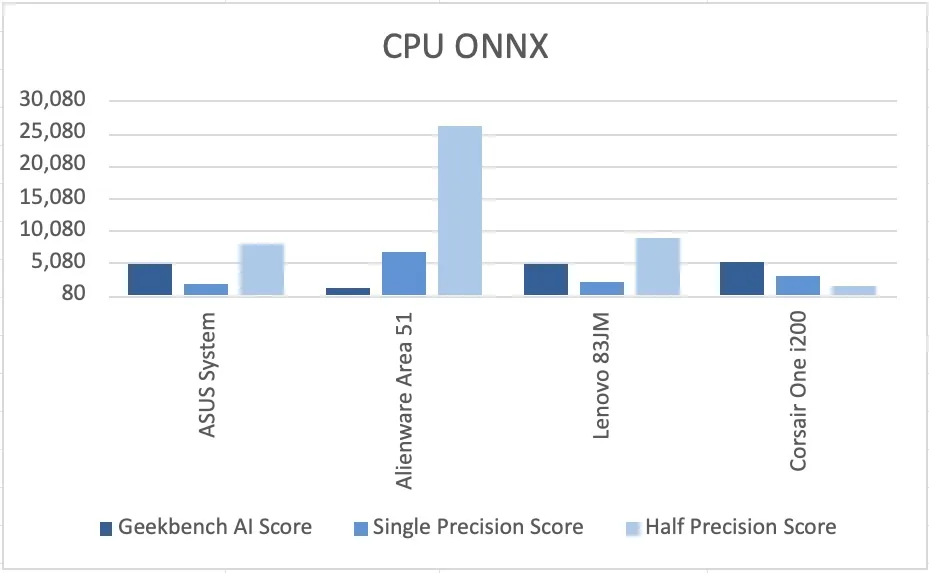
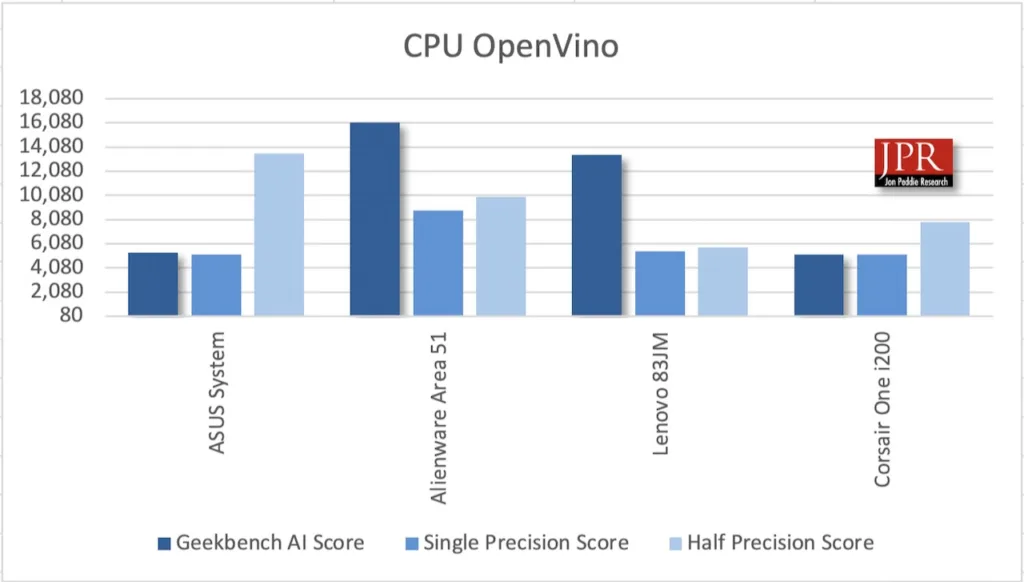
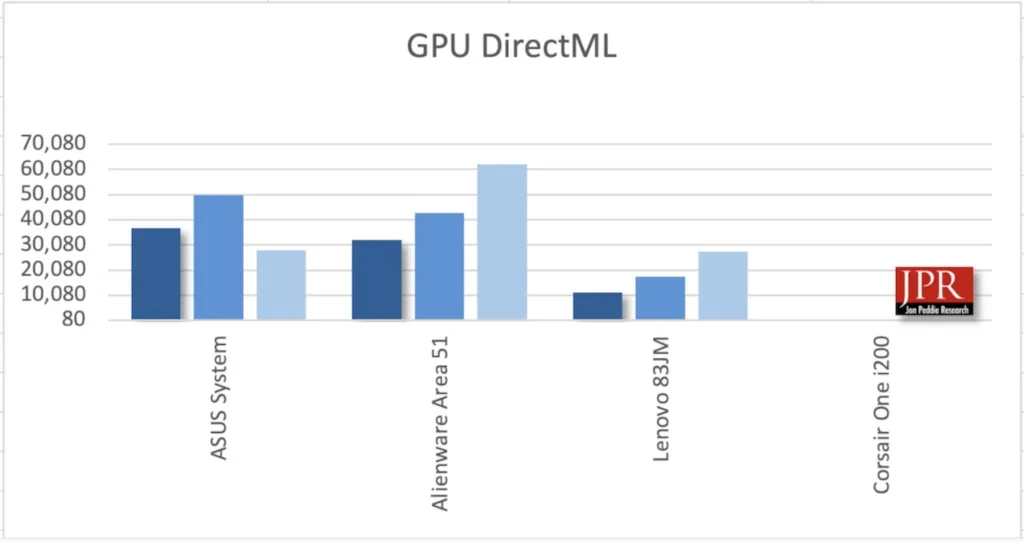
The ONNX and DirectML GPU test used all the RAM available to the Lenovo iGPU, and the test would never complete.
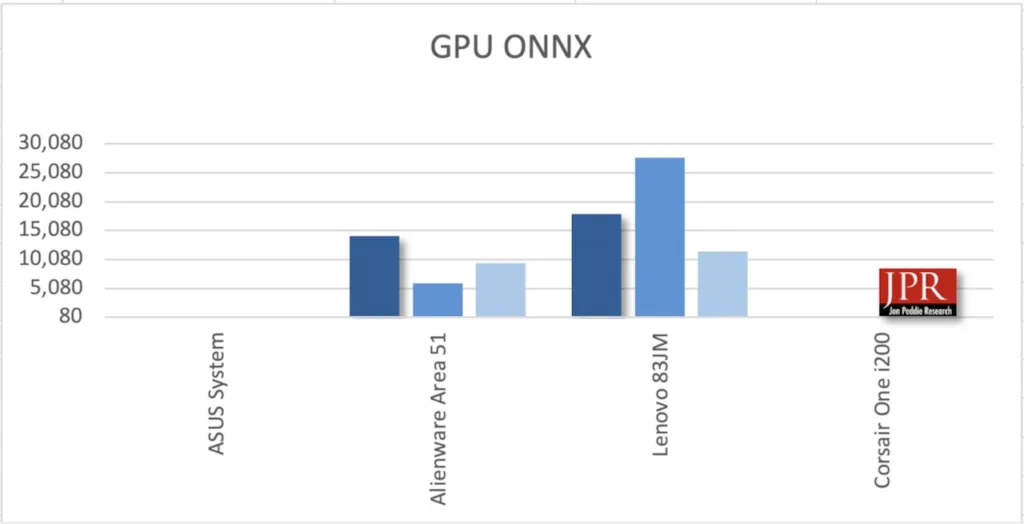
GPU OpenVino ran on the Lenovo but was not available on the other machines due to a driver issue.
What do we think?
The multi-core fix matters more than the CUDA support gets credit for. Synthetic benchmarks only stay useful if they track real behavior, and Geekbench 6’s all-cores-always approach stopped doing that years ago. For CIOs comparing hardware quotes, Geekbench 7’s scores are worth trusting again. For silicon teams, the GPU suite’s ML focus signals where competitive pressure is building. However, the lack of consistency from machine to machine leaves something to be desired.
Inflection point
CUDA support marks an inflection point for cross-platform benchmarking: For the first time, one tool can measure an Nvidia GPU with the same API stack that runs production AI workloads. Paired with Geekbench AI’s CPU-GPU-NPU breakdown, silicon teams finally get a consistent way to compare AI hardware claims across vendors and platforms. The real signal isn’t CUDA itself; it’s that benchmarking tools are racing to keep pace with how fast AI workloads moved onto everyday devices.
WHAT DO YOU THINK? GOOD ENOUGH TO TELL YOUR FRIENDS ABOUT IT? YOU HAVE OUR PERMISSION TO SHARE IT.