

Introduction
The handheld PC gaming market has spent two years stuck in an awkward compromise. Buyers had to choose between raw compatibility, battery life, and consistent performance, and no single device delivered all three. The MSI Claw 8 EX AI+ is the first handheld built to break that pattern, and it does so on the back of an entirely new piece of silicon: Intel’s Arc G3 Extreme, the first SoC Intel has ever purpose-built for handhelds rather than adapting from a laptop part.
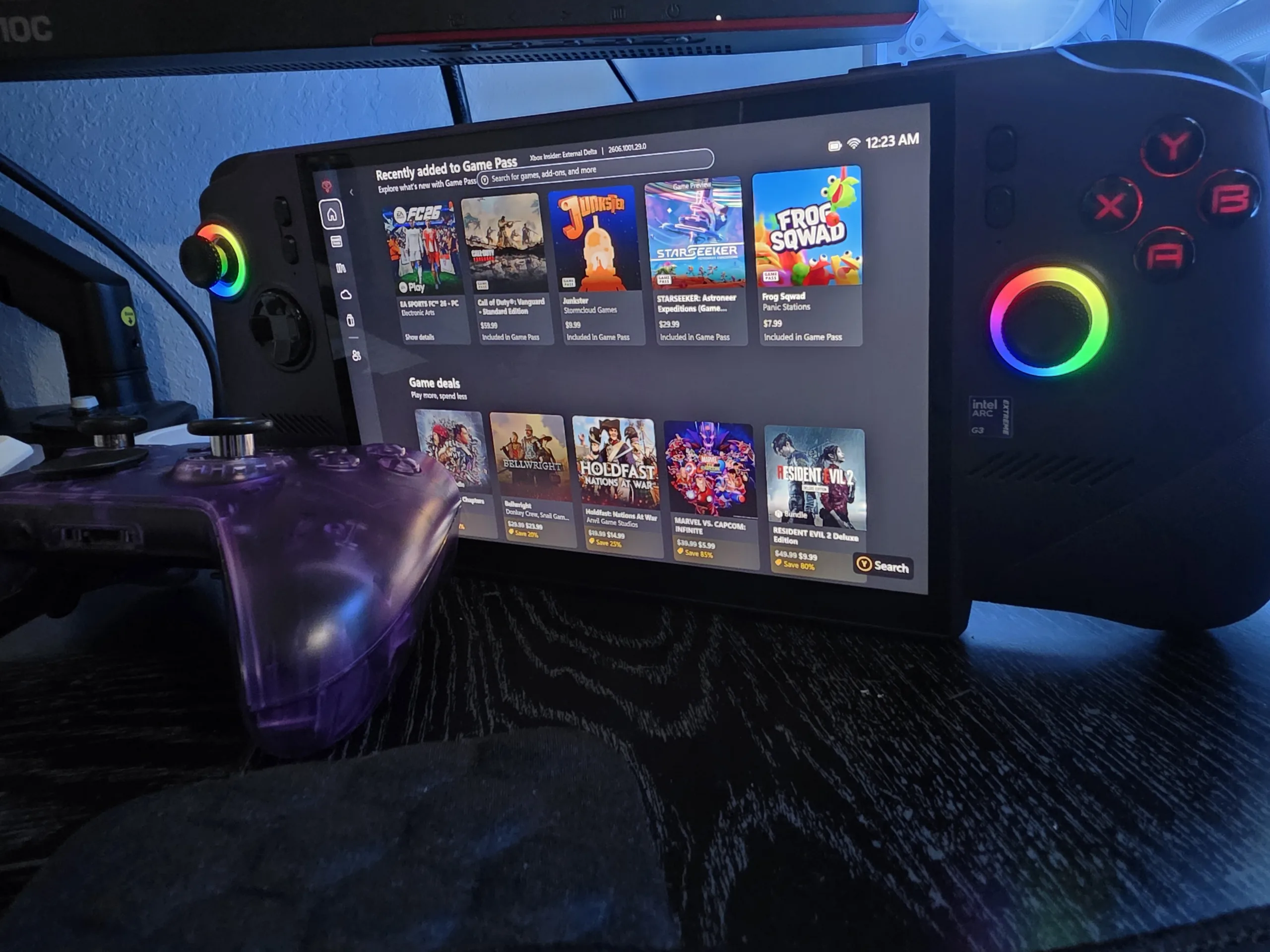
This is a ground-up rethink. Intel cut the CPU down to 2 Performance cores to free up the entire power budget for graphics, scaled the Xe3 GPU up to 12 Xe-cores, and built a new power-sharing layer that physically parks the P-cores at low wattage. Paired with 32GB of LPDDR5x-8533, a full-size M.2 2280 storage slot, and an 80Whr battery, the Claw 8 EX AI+ is positioned squarely against the ASUS ROG Xbox Ally X and the established RDNA handhelds.
We’ve been running this unit hard since the press kit arrived, using our full benchmark suite: 3DMark synthetics, sustained thermal loops, and a wide spread of AAA and esports titles at native 1200p. We evaluate it on Windows 11 25H2 against the previous-generation Intel handheld and the AMD Z2 Extreme competition.
The short version, before the data: the name is a mouthful, but we came away delighted. This is Intel’s third handheld chip, and it is the one where the conversation starts and ends with the processor. The Arc G3 Extreme is a true next-gen experience, an easy 43% clear of the Claw 8 AI+ that came before it on average across a 36-game spread at 35W, and that gap widens further once wattage scaling and XeSS 3 enter the picture. Against an aging Steam Deck the distance stretches into multigenerational territory. After years of AMD running the table, AMD finally has fantastic competition, with a non-Extreme G3 variant arriving soon to widen the range. Gamers may balk at the price of this specific handheld, and we understand why, but this is a long-overdue leap in power and a genuinely exciting signal for where handhelds are heading.
Specifications
| Spec | MSI Claw 8 EX AI+ |
|---|---|
| SoC | Intel® Arc™ G3 Extreme |
| GPU | Intel® Arc™ B390, Xe3 architecture, 12 Xe-cores |
| AI / RT Hardware | 96 XMX AI Engines, 12 Ray Tracing Units |
| CPU | 14-core: 2 Cougar Cove P-cores + 8 Darkmont E-cores + 4 Darkmont LP E-cores |
| CPU Lithography | Intel 18A |
| GPU Peak TOPS | 113 TOPS |
| Memory | 32GB LPDDR5x-8533 onboard |
| Display | 8″ FHD+ (1920×1200), Touch IPS, 48-120Hz VRR, 100% sRGB, 500 nits |
| Storage | 1TB NVMe M.2 2280, PCIe Gen4 x4 |
| Connectivity | 2x Thunderbolt™ 4, Wi-Fi 7 R2 BE213, Bluetooth 6.0 |
| Configurable TDP | 8W – 35W |
| Battery | 4-Cell Li-Polymer, 80Whr |
| AC Adapter | 65W USB-C PD 3.0 |
| Weight | 785 g |
| OS | Windows 11 Home with Xbox Mode |
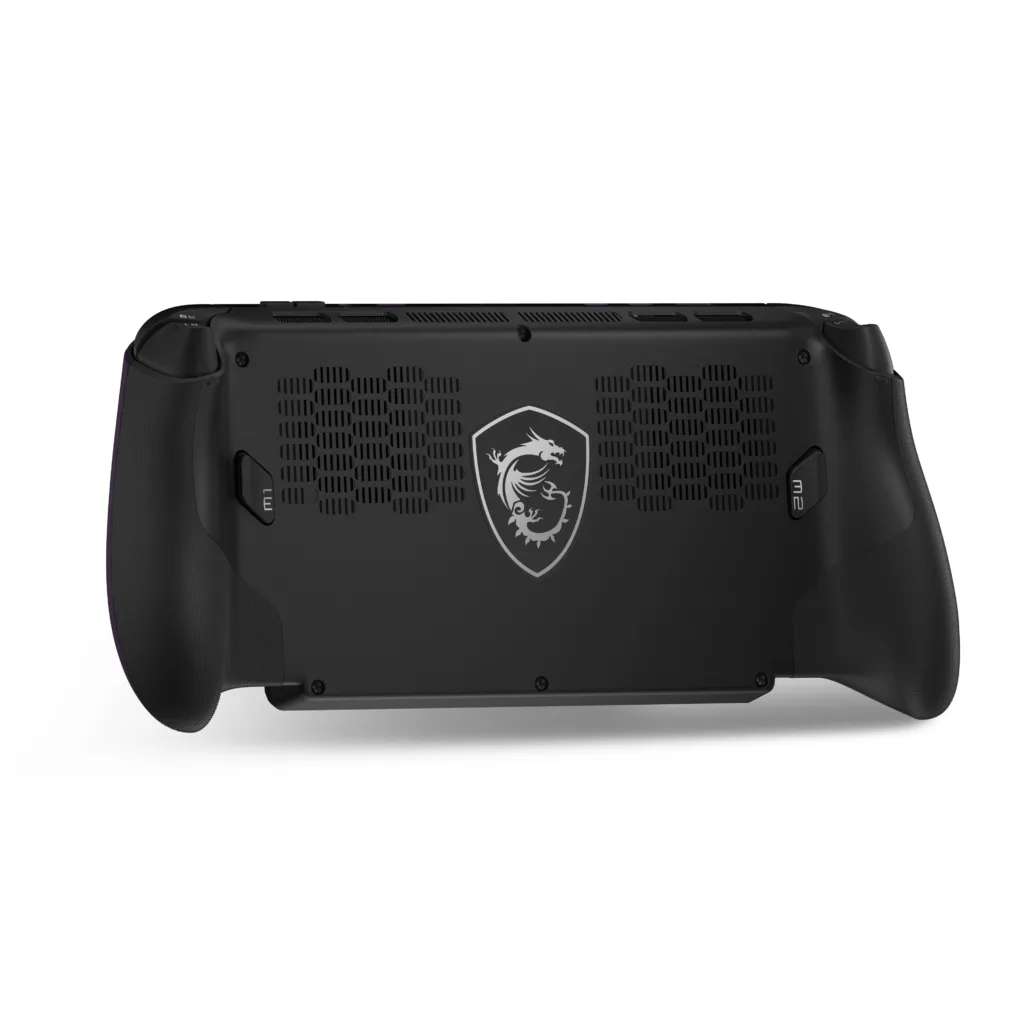
The architectural story is about rebalancing. Intel’s previous handheld parts carried 4 P-cores; the Arc G3 Extreme drops to 2 and pours the reclaimed power into the GPU. The Xe3-based B390 scales to 12 Xe-cores against 8 in the prior Xe2 generation, doubles the L2 cache to 16MB, grows the shared L1 by 33% to 256KB, and adds variable register allocation that lifts thread utilization by up to 25%. Two integrated Thunderbolt 4 controllers, a redesigned chassis with Hall Effect sticks and a metal-dome D-pad, and a user-accessible M.2 2280 slot round out a genuine premium redesign rather than a spec bump.
Where It Sits in the Handheld Market
| Handheld | Processor | Memory | Storage | Battery | Launch Price | Notes |
|---|---|---|---|---|---|---|
| MSI Claw 8 EX AI+ This Review | Arc G3 Extreme (18A CPU) | 32GB LPDDR5x | M.2 2280 | 80Whr | $1,799+ | Xe3, first purpose-built Intel handheld SoC |
| ASUS ROG Xbox Ally X | Ryzen AI Z2 Extreme | 24GB LPDDR5x | M.2 2280 | 80Whr | $999 | RDNA, mature driver stack |
| MSI Claw 8 AI+ | Core Ultra 7 258V | 32GB LPDDR5x | M.2 2280 | 80Whr | $899 | Xe2, the direct predecessor |
| Valve Steam Deck OLED | Custom Sephiroth (6nm) | 16GB LPDDR5 | M.2 2230 | 50Whr | $549 (raised) | SteamOS, recently price-bumped |
Arc G3 Extreme: The Architecture
The Arc G3 Extreme is built from three active tiles. The GPU tile carries 12 Xe-cores, 96 XMX AI engines, 12 ray tracing units, and 16MB of GPU cache. The compute tile holds the 14-core CPU (2 Cougar Cove P-cores, 8 Darkmont E-cores, 4 Darkmont low-power E-cores), 12MB of smart cache, an 8MB memory-side cache, NPU 5, and the media and display engines. The platform controller tile provides 12 PCIe lanes, the two Thunderbolt 4 controllers, and integrated Wi-Fi 7 R2 with Bluetooth 6.0.
The performance gain over the Xe2-based Core Ultra 200V generation comes mainly from the GPU scaling from 8 to 12 Xe-cores, which proportionally raises the XMX AI engine and ray tracing unit counts. Three cache and scheduling changes back it up: the shared L1 grows 33% to 256KB to cut L2 traffic, the L2 doubles to 16MB to cut memory traffic, and variable register allocation lifts thread utilization by up to 25%. The CPU is fabbed on Intel 18A, with the P-cores boosting to 4.7 GHz.
The GPU: Arc B390, Xe3
Each Xe-core bundles Xe Vector Engines, XMX AI engines, and a ray tracing unit tuned for parallel graphics, compute, and AI work. The B390 fields 12 of them feeding a 16MB L2, with 12 ray tracing units, 12 texture samplers, and 4 pixel backends behind two render slices. Graphics clock runs to 2300 MHz and the GPU rates 113 peak TOPS. It is a full DirectX 12 Ultimate part with Vulkan 1.4 and OpenGL 4.6 support, and the media engine handles AV1 and H.266 decode alongside the usual H.264/H.265 encode and decode. Versus the non-Extreme G3 (10 Xe-cores, 80 XMX engines, 90 TOPS), the Extreme is the fully-enabled die.
The CPU: Cougar Cove + Darkmont, 18A
The compute tile is a 14-core hybrid: 2 Cougar Cove P-cores boosting to 4.7 GHz, 8 Darkmont E-cores, and 4 Darkmont low-power E-cores, all on Intel’s 18A node. Dropping from 4 P-cores to 2 is the deliberate trade that frees power for the GPU. The throughput cost is more than offset by the wider E-core array, as the multi-core synthetics show against the prior generation.
| CPU Benchmark (10 min sustained) | Arc G3 Ext AC power |
Arc G3 Ext DC power |
Core Ultra 258V prior gen |
|---|---|---|---|
| Cinebench 2026 Multi-Core | 3,388 | 3,400 | 1,929 |
| Cinebench 2026 Single-Core | 459 | 435 | 478 |
| Cinebench 2024 Multi-Core | 835 | 902 | 477 |
| Cinebench 2024 Single-Core | 117 | 117 | 121 |
| CrossMark Overall | 1,882 | 1,187 | 1,815 |
Drivers: The Quiet Headline
The most consequential change for anyone who lived through early Arc is not on the spec sheet. Intel’s driver stack has matured to the point where day-0 optimizations, Vulkan 1.4 upstreaming, and Precompiled Shaders ship as standard rather than arriving months after launch. The single most common Intel handheld complaint, first-run compilation stutter on DirectX 12 titles, is now handled structurally. One practical note that matters for results: the publicly available driver (build 8826) is not the same as the press-portal driver, and they can produce different numbers. Every BTR figure here was captured on the press-portal build on Windows 11 25H2 (26200.8457).
Benchmark Methodology
Device: MSI Claw 8 EX AI+ | SoC: Intel Arc G3 Extreme | Memory: 32GB LPDDR5x-8533 | Storage: 1TB PCIe Gen4 M.2 2280 | Display: 8″ 1920×1200 120Hz VRR
Software: Windows 11 25H2 (26200.8457) | Intel Arc GPU Driver from Intel press portal | NPU Driver 32.0.100.4778 | BIOS E1T91IMS.105 | VBS enabled | V-Sync off, frame caps off for baseline runs
For handheld testing we run native 1920×1200, the device’s out-of-box resolution, with High presets unless noted. Frame generation and multi-frame generation are disabled for baseline raster and RT passes, then evaluated separately as a smoothness layer. All captures use CapFrameX. Per Intel’s own guidance, when measuring any frame generation technology we enable Use MsBetweenDisplayChange in CapFrameX so the analysis reflects frames actually shown on the display rather than frames submitted by the application. We disclose AC versus battery and the active MSI Center M power preset for every run. Power presets used: AI Engine (25W default, 15-30W dynamic), Manual (PL1/PL2 set explicitly, PL2 kept at least 2W above PL1 per Intel guidance), and Endurance.
Intel and MSI shipped a near-perfect representative setup, which is worth describing because it mirrors how a buyer would actually live with this device:
- 1x MSI Claw 8 EX AI+ with Intel Arc G3 Extreme
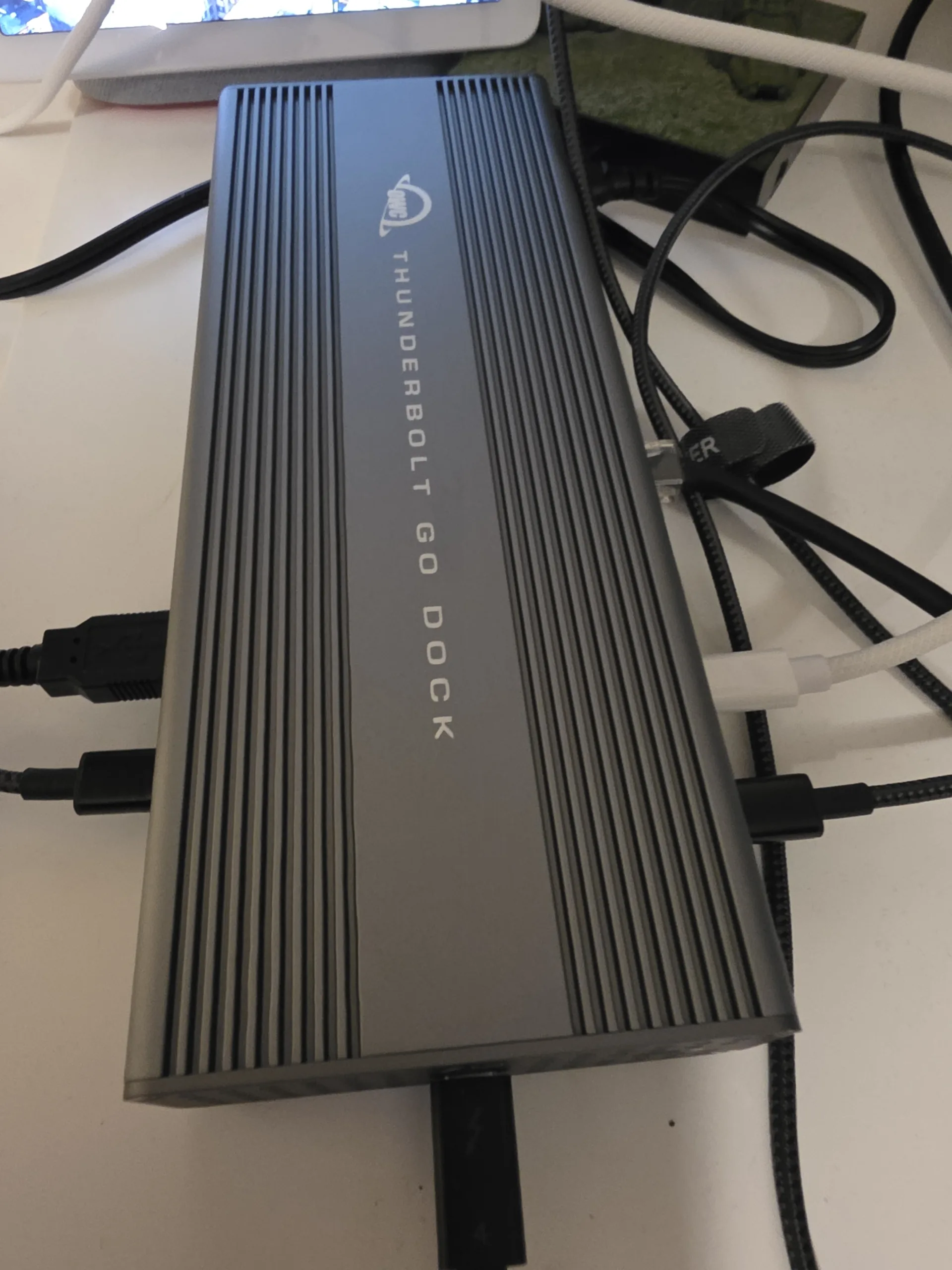
- 1x OWC Thunderbolt 4 Go Dock (Thunderbolt Share licensed)
- 1x Samsung Galaxy Buds4 Bluetooth earbuds
- 1x game download code for LEGO Batman: Legacy of the Dark Knight
It is worth being clear that the dock and earbuds are not bundled with retail units and are not needed to enjoy the handheld. Both are separate purchases that add to what is already a large-ticket device. We include them because together they show how the platform behaves as a complete setup, and we cover what each one adds in the relevant sections.
3DMark and CPU Synthetics
These are our measured results from the BTR lab on the Claw 8 EX AI+ at its default AI Engine preset.
The generational story on the CPU side is striking. Against the Core Ultra 7 258V predecessor, Cinebench 2026 multi-core leaps about 76% (3,388 vs 1,929) while single-core holds roughly level. That is the expected shape: Intel did not chase single-thread, it widened throughput and handed the power headroom to the GPU.
1920×1200 Native Gaming
All tests at native 1200p, High preset, upscaling and frame generation off. These are the device’s out-of-box gaming conditions and the fairest read on raw GPU capability.
Claw 8 EX AI+
Claw 8 EX AI+
Claw 8 EX AI+
| Game / Settings (1200p High) | Claw 8 EX AI+ Arc G3 Extreme |
Claw 8 AI+ Core Ultra 258V |
|---|---|---|
| Native Resolution AAA Pass (Upscaling / FG Off) | ||
| Cyberpunk 2077 (High) | 44 | 26 |
| Shadow of the Tomb Raider (High) | 72 | 42 |
| Horizon Zero Dawn (High) | 38 | 21 |
| Red Dead Redemption 2 (High) | 32 | 19 |
Versus AMD: The Power-Band Story
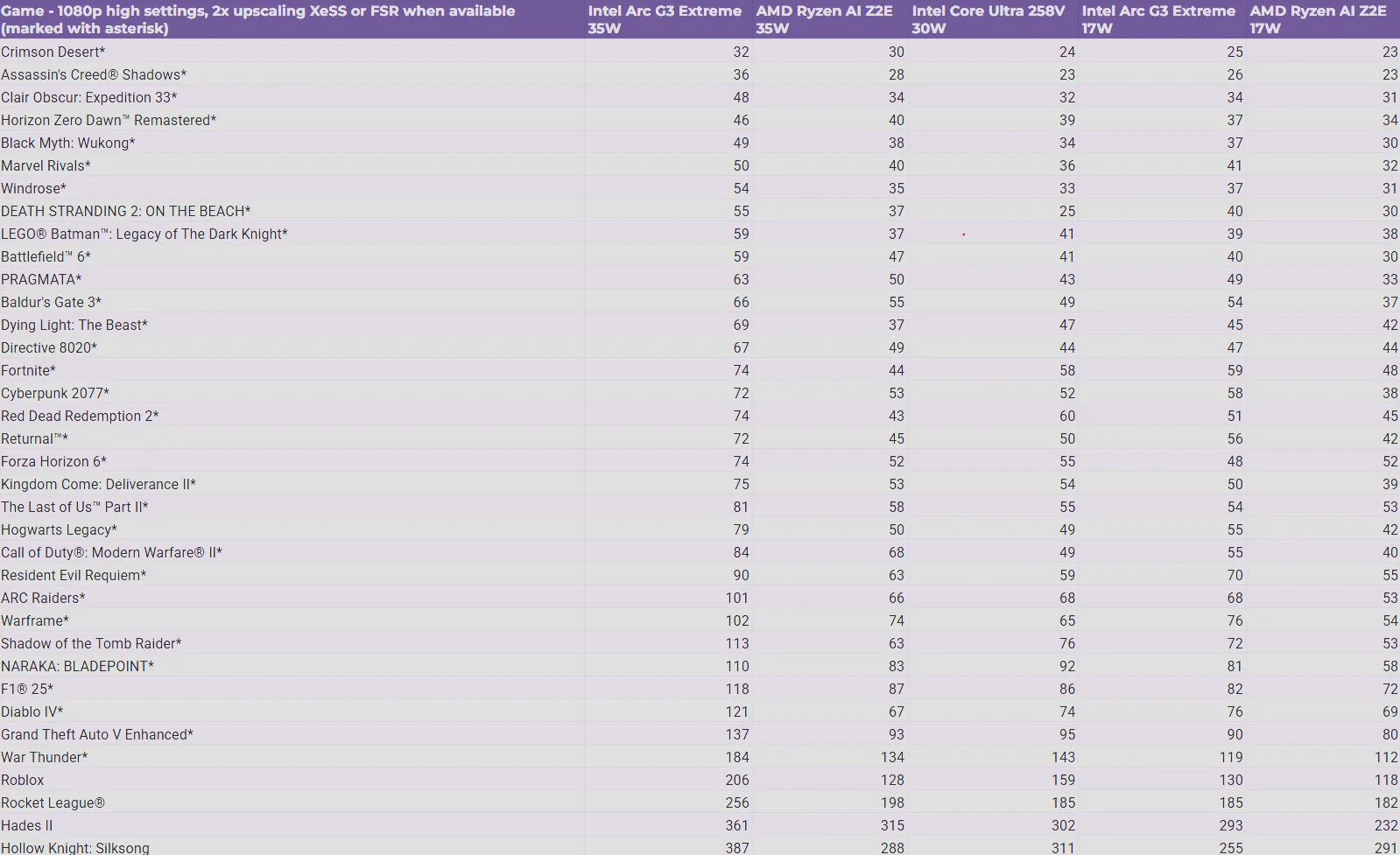
This is the heart of the review, and these are our own measured numbers, not Intel’s reference figures. We ran the Arc G3 Extreme against the AMD Ryzen AI Z2 Extreme in the ROG Xbox Ally X at 1080p High with 2x upscaling on both platforms, across the full 36-game suite, at multiple power levels. The shape of the data is what matters: the advantage is not a flat percentage, it grows as power drops. At equal 35W the Arc G3 Extreme averages 41% ahead (geomean across all 36 titles). Drop the Intel part to 17W and it still matches the AMD chip running a full 35W, our geomean lands at a dead-even 1.005x, which is the 2x performance-per-watt story in a single number. At matched 17W the Intel lead is 20% on average. That widening-as-power-falls curve is the Intelligent Bias Control payoff.
vs AMD Z2E 35W baseline
vs AMD Z2E 35W
vs AMD Z2E 17W
vs Core Ultra 258V (prior gen)
The table below is a representative slice of the suite spanning demanding AAA and mid-load competitive titles. The 17W Intel column is the one to watch against the 35W AMD column.
| Game (1080p, 2x upscaling) | Arc G3 Ext 35W |
AMD Z2E 35W |
Arc G3 Ext 17W |
AMD Z2E 17W |
|---|---|---|---|---|
| Demanding AAA Pass | ||||
| Cyberpunk 2077 | 72 | 53 | 58 | 38 |
| Black Myth: Wukong | 49 | 38 | 37 | 30 |
| Assassin’s Creed Shadows | 36 | 28 | 26 | 23 |
| Clair Obscur: Expedition 33 | 48 | 34 | 34 | 31 |
| Hogwarts Legacy | 79 | 50 | 55 | 42 |
| Mid-Load & Competitive Pass | ||||
| Call of Duty: Modern Warfare II | 84 | 68 | 55 | 40 |
| Shadow of the Tomb Raider | 113 | 63 | 72 | 53 |
| Resident Evil Requiem | 90 | 63 | 70 | 55 |
| F1 25 | 118 | 87 | 82 | 72 |
| Grand Theft Auto V Enhanced | 137 | 93 | 90 | 80 |
Intelligent Bias Control and Low-Power Play
Intelligent Bias Control is the firmware layer that manages how power is shared between CPU and GPU. It is always on at the platform level and is not a user toggle. The version exclusive to the Arc G3-Series, IBC v3.5, adds the key new behavior: at 14 watts and below it parks the two Cougar Cove P-cores entirely, shifting the workload onto the efficient Darkmont E-cores so the GPU keeps the lion’s share of the budget. On older parts the CPU would aggressively claw back power at these low limits and starve the graphics cores.
The effect is uneven by title, which is expected for a power-sharing algorithm. The IBC on/off and 12W figures in this section are Intel’s published data; our own 12W testing is ongoing and will be added when complete. Intel’s on/off testing across 8 games at 12W shows a range from roughly +1% in CPU-light Counter-Strike 2 up to +31% in F1 25 with 2x frame generation (Tomb Raider without FG lands at +27%), averaging about 13%. The practical result is playable framerates at a 12W floor in titles that were a slideshow on prior Intel handhelds.
| Game (1080p Low, 12W, 2x upscaling) | Arc G3 Ext 12W |
AMD Z2E 12W |
|---|---|---|
| Cyberpunk 2077 | 55 | 39 |
| Shadow of the Tomb Raider | 67 | 41 |
| Hogwarts Legacy | 57 | 41 |
| F1 25 | 83 | 56 |
| Grand Theft Auto V Enhanced | 99 | 71 |
| Marvel Rivals | 51 | 28 |
XeSS 3 and Frame Generation
XeSS 3 pairs AI-based Super Resolution with the new AI-based Multi-Frame Generation (XeSS-MFG), which trades a portion of rendered frames for a larger number of smoothing frames. It runs on the 96 XMX AI engines. Any XeSS 2 title supporting Xe Low Latency v1.1 or higher can pick up MFG through a driver override in Intel Graphics Software, and Intel is working with MSI to surface a toggle in the MSI Quick Settings overlay inside the Xbox Game Bar. More than 110 titles are MFG-compatible at launch.
Here is our full bench suite we ran at 1080p with XeSS or FSR when available, AMD Z2E results are from the XBOX Ally X:
| Cyberpunk 2077 (1080p High, 35W) | Avg FPS | Mode |
|---|---|---|
| AMD Z2E, FSR Super Resolution | 52 | SR only |
| Arc G3 Ext, XeSS Super Resolution | 73 | SR only |
| AMD Z2E, FSR + 2x Frame Gen | 89 | SR + 2x FG |
| Arc G3 Ext, XeSS 2 + 2x Frame Gen | 121 | SR + 2x FG |
| Arc G3 Ext, XeSS 3 + 4x Multi-Frame Gen | 199 | SR + 4x MFG |
Endurance Gaming and Battery Life
Endurance Gaming communicates a target frame rate of 30, 40, or 60 to the driver, and Intel’s Dynamic Tuning Technology drops SoC power to hold that target. The three modes map to Efficiency (30 FPS), Balanced (40 FPS), and Performance (60 FPS), set in the Graphics section of Intel Graphics Software. MSI’s own Endurance power preset auto-enables the 30 FPS Efficiency mode whenever the device is on battery.
The benefit scales with how much framerate is being shed. Team Fortress 2 is the best case: capping a very high uncapped framerate to 30 drops total SoC package power from 22W to just 4W, stretching a session from under four hours to nearly twelve. Heavier titles see proportionally smaller but still meaningful gains: Forza Horizon 6 goes from 2h 47m to 5h 51m, and GTA V Enhanced from 2h 31m to 5h 55m. This is the lever that converts the architecture’s efficiency lead into real-world playtime.
Precompiled Shaders
First-launch shader compilation stutter has been the chronic weak spot for Intel graphics. Precompiled Shaders, introduced in March 2026, sidesteps it by downloading pre-optimized shader binaries from Intel’s cloud for select Steam titles during install, so the first run skips on-the-fly compilation. Across the currently supported set the average improvement to time-to-first-play is greater than 3x, and the per-title range is wide: from 1.3x in Black Myth: Wukong up to 26x in God of War Ragnarok, with Call of Duty: Black Ops 7 at 6.2x. In practice it removes the navigation micro-stutters that plagued earlier Intel handhelds on DirectX 12 titles.
Hardware, Cooling, and Ergonomics
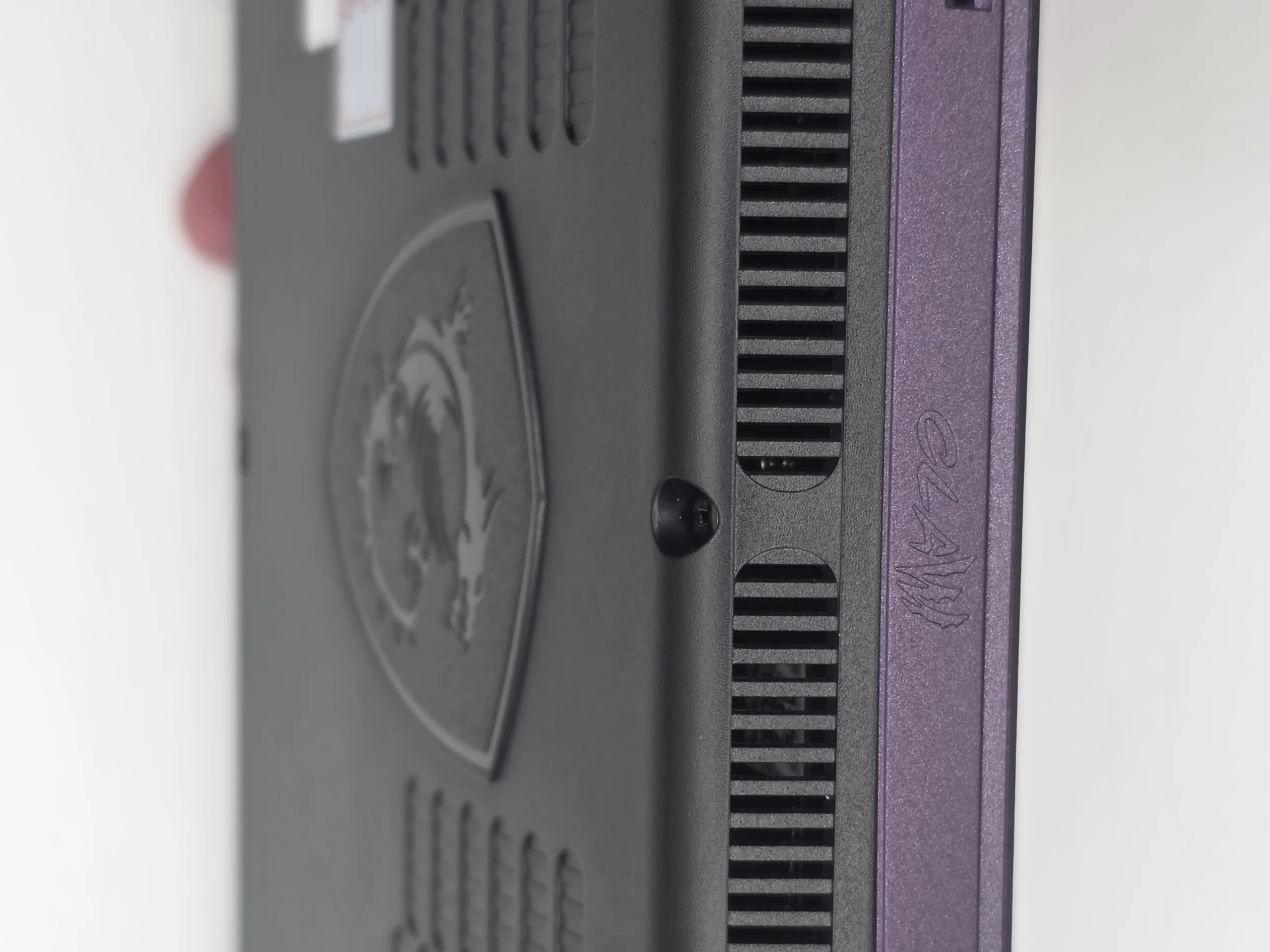
MSI carried over its Cooler Boost HyperFlow design, the interflow thermal layout first seen on the original Claw, and raised the fan height by 0.5mm this generation. That nets 5W of additional cooling capacity, 25% higher static pressure, and 9% more airflow versus the Claw 8 AI+. In our sustained Cinebench R23 loop the multi-core score held flat across 100 consecutive runs with no visible throttling step-down, which is the behavior you want from a handheld meant for long sessions.
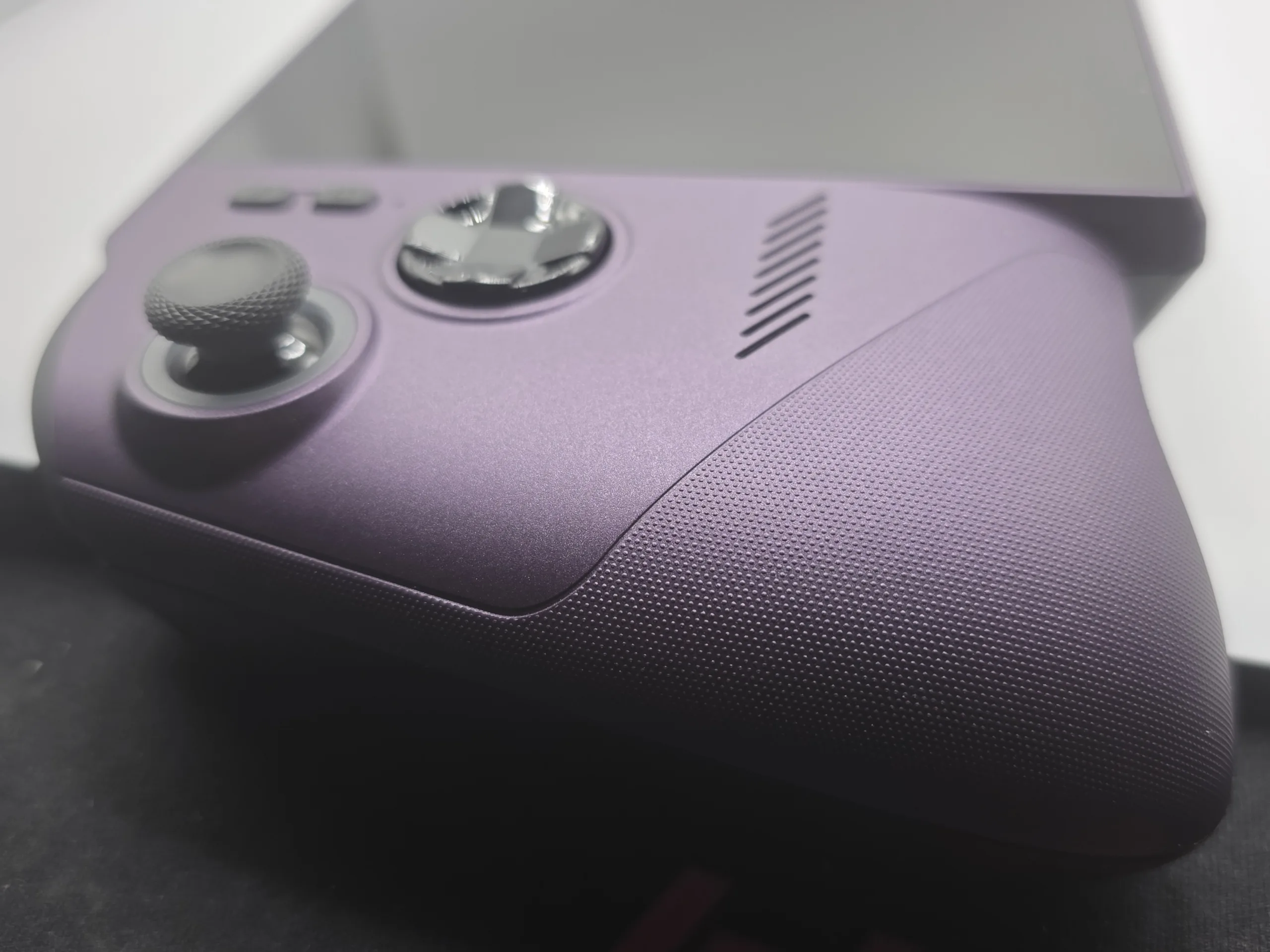
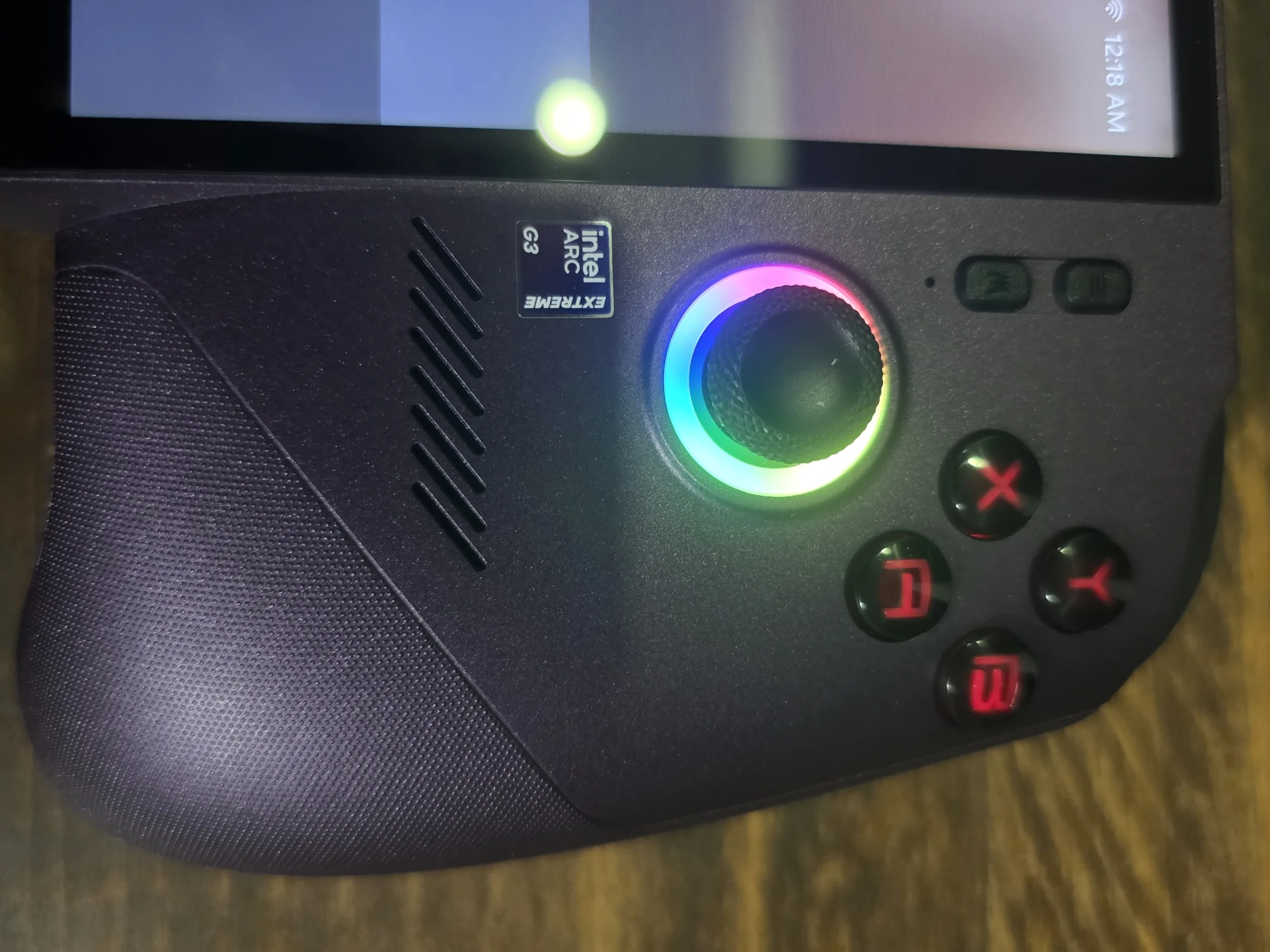
Ergonomically the chassis is a real revision. A flared grip inspired by the Xbox controller and a laser-etched dot texture improve the hold, the A/B/X/Y buttons get rounded edges, and the D-pad moves to a metal dome for a clickier actuation. Sticks and triggers are Hall Effect, rated drift-free. The haptics are upgraded to a new LRA and voice coil motor with a signal-conversion engine that maps native rumble into higher-fidelity HD haptics at under 5ms latency. The storage slot moves to the standard M.2 2280 form factor, accessible by removing six Phillips screws on the back cover.
Thunderbolt 4 and Docking
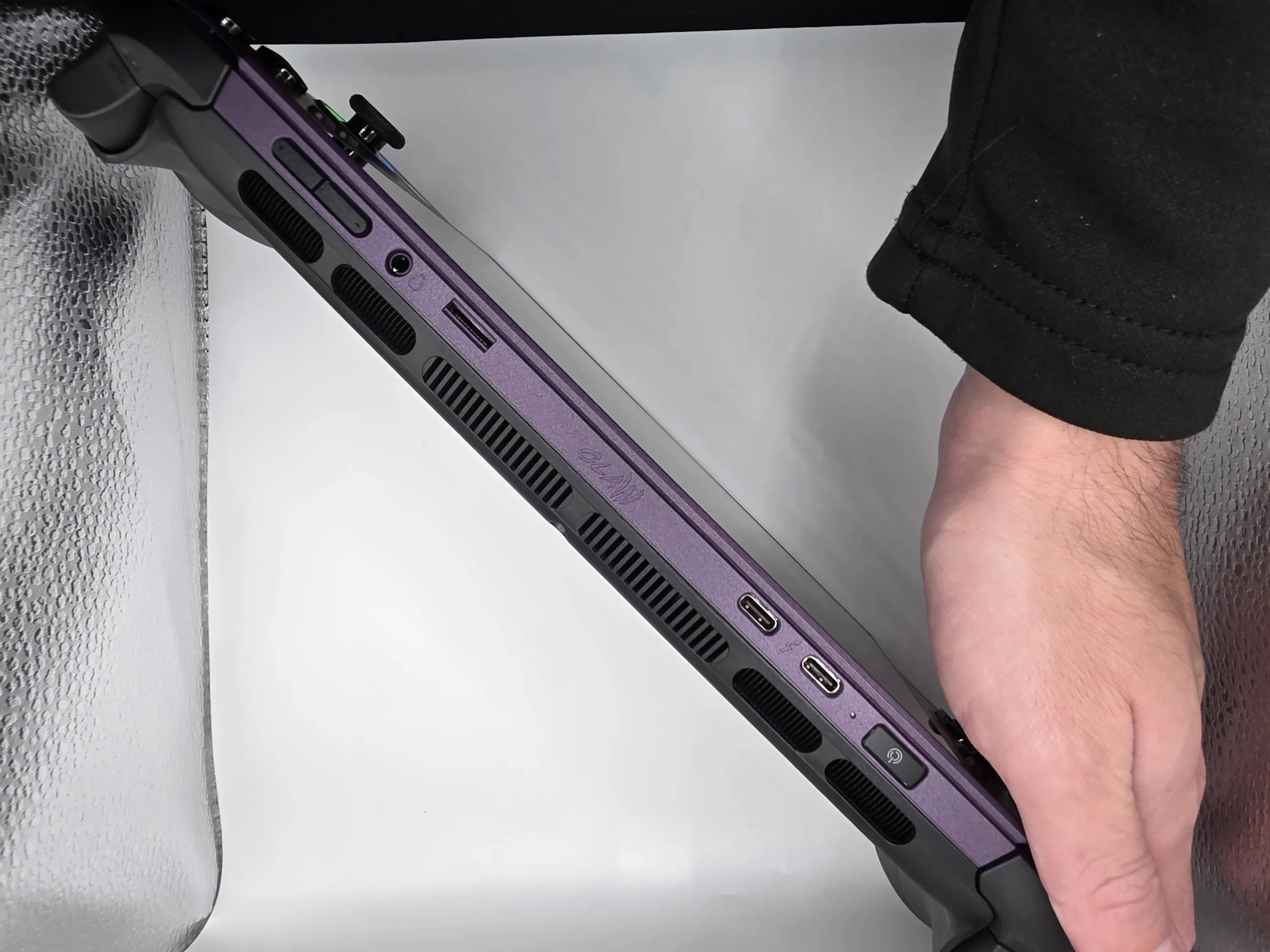
The two Thunderbolt 4 ports are more flexible than the single USB-C most handhelds ship with. Each handles docking, power delivery, peripherals, and external display over one cable, with full USB4 compliance and backward compatibility with Thunderbolt 3, 4, and 5 devices. The practical payoff is a true single-cable living-room setup: HDMI from a dock to the TV, a controller on a downstream port, and the handheld charging through the same connection. Our review kit shipped with an OWC Thunderbolt Go Dock, which is Thunderbolt Share licensed.
Thunderbolt Share is the feature worth calling out for buyers migrating from a desktop or laptop. It moves large game libraries between a PC and the handheld in minutes rather than hours over the wire, and it can drive the handheld from a PC’s screen, keyboard, and mouse, or stream and record handheld gameplay back to the PC. It requires at least one Thunderbolt Share licensed device in the chain; the bundled OWC dock qualifies.
This is where the OWC dock stopped being a checkbox and became the highlight of the kit. Moving our entire Steam library and benchmarking suite onto the Claw is normally an overnight chore over Wi-Fi or a slow USB drive. Through the dock and Thunderbolt Share, we drag-and-dropped the whole set across at full Thunderbolt speed and were testing the same day. That single experience reframes how these devices fit into a real workflow: dock the handheld at a desk, pull files and drive it from a full keyboard and monitor in work mode, then undock and game portably. The dock is genuinely optional, but it is one of the best arguments for spending into the ecosystem.
The other payoff of full Thunderbolt 4 is eGPU support. An external GPU enclosure turns the same handheld into a desktop-class gaming rig when docked, then detaches completely for portability. Pairing a dock or eGPU with the device’s new Endurance modes is the whole pitch in one sentence: maximum performance when plugged in, maximum playtime when you walk away.
Wi-Fi 7: BE213 and the 6 GHz Band
The Claw 8 EX AI+ uses Intel’s Wi-Fi 7 BE213 card, which reaches the 6 GHz band with 160 MHz channels. That matters for a handheld more than for a desktop: a portable device gets carried into congested 2.4 and 5 GHz environments, and the 6 GHz band sidesteps the legacy traffic that bogs those bands down. Intel measured over-the-air throughput at four distances against 5 GHz/80 MHz, and the 6 GHz advantage held up as range and walls increased rather than collapsing.
| Distance From Router | 6 GHz / 160 MHz Mbps |
5 GHz / 80 MHz Mbps |
Advantage |
|---|---|---|---|
| 1 m / 3 ft | 2,262 | 1,135 | 2.0x |
| 3 m / 10 ft | 2,182 | 1,117 | 2.0x |
| 26 m / 85 ft (2 walls) | 1,333 | 792 | 1.7x |
| 49 m / 161 ft (5 walls) | 550 | 420 | 1.3x |
Bluetooth 6.0 and LE Audio
Bluetooth on Windows handhelds has a deserved reputation for being temperamental, and audio quality in particular has historically fallen apart the moment a microphone activates. The BE213’s Bluetooth 6.0 with LE Audio is the first time this has felt genuinely solved on a device like this. The LC3 codec delivers up to 50% lower bit rates and up to 50% lower power than classic Bluetooth audio, with up to 50% longer range. We flag this because Bluetooth is the single feature most likely to frustrate a buyer coming from an older handheld, and here it simply works.
Two Windows 11 features built on LE Audio are the real quality-of-life wins. Super Wideband Stereo keeps full stereo audio active while the microphone is in use; previously, the second you joined a game chat or a call, Bluetooth output dropped to muffled mono. Shared Audio lets two LE Audio headsets listen to the same stream with independent volume control, which is genuinely useful on a portable. Both require Windows 11 25H2 (build 26200.8522 or newer) and Bluetooth driver 24.40.0 or newer, and are rolling out gradually.
The Samsung Galaxy Buds4 in Practice
The bundled Galaxy Buds4 made all of this concrete. Pairing was a Swift Pair pop-up: open the case, a Windows notification slides in at the bottom-right offering to connect, one click, done. No digging through settings, no failed handshakes, no re-pairing on the next boot, and the same flow every time we reconnected. The link then stayed locked through extended sessions with latency low enough that audio cues tracked the action, and it held full stereo when we dropped into voice chat. The BE213 radio paired with Samsung’s LE Audio earbuds is the smoothest wireless audio experience we’ve had on a Windows handheld, the kind of polish that used to belong only to closed consoles.
Software: MSI Center M and Quick Settings
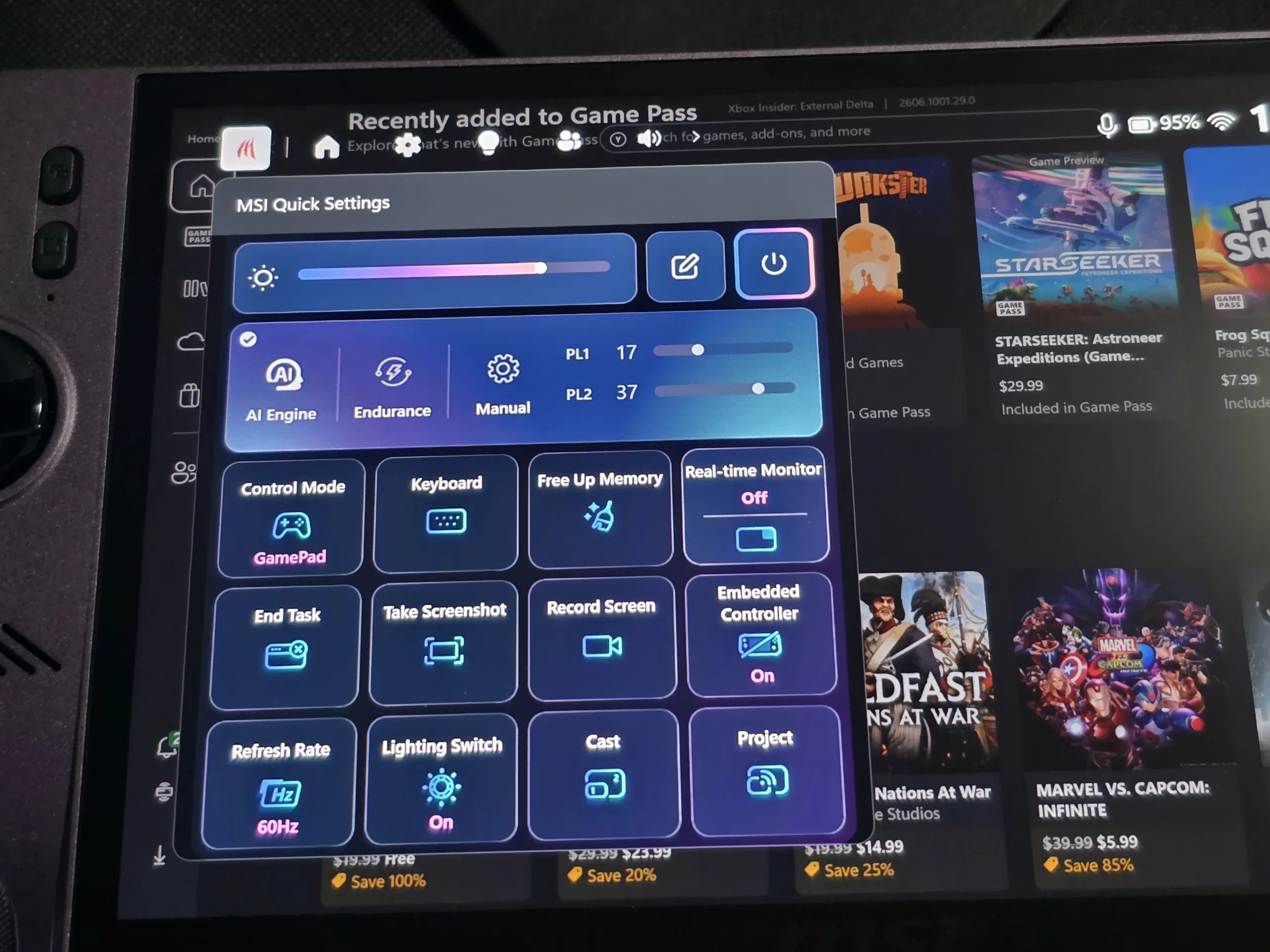
MSI Center M handles the power presets (AI Engine, Endurance, Manual), key binding, and the redesigned navigation. The three presets map to real PL targets: AI Engine runs games at 25W by default and adjusts dynamically (PL1 15-30, PL2 20-37), Endurance caps at PL1 15 / PL2 20, and Manual exposes the full 8-35W range. The redesigned Quick Settings overlay inside the Xbox Game Bar adds in-overlay power-level adjustment with a translucent UI that occupies about a third of the screen. Intel and MSI are working to surface XeSS Multi-Frame Generation and Endurance Gaming toggles directly in that overlay; at the time of testing those are set in Intel Graphics Software. MSI’s App Player additionally brings Android titles to the device alongside Windows games.
BTR’s Verdict: Intel Arrives in Handhelds
The MSI Claw 8 EX AI+ is the first time Intel has shown up to the handheld fight with silicon designed for it from the start, and it shows. This is Intel’s third handheld chip, and the conversation begins and ends with the Arc G3 Extreme. By trimming the CPU to two P-cores and pouring the budget into a 12 Xe-core Xe3 GPU, Intel built a part whose advantage is widest exactly where handhelds spend their time: the low end of the power band. The standout claim, that 17 watts of Arc G3 Extreme matches 35 watts of AMD Z2 Extreme, holds up across a broad game set and reframes what battery-conscious handheld gaming can look like.
The generational leap is the headline. Against the Claw 8 AI+ it replaces, the G3 Extreme is 43% faster on average across a 36-game set at 35W (our geomean), and that is before wattage scaling and XeSS 3 enter the picture, where the effective gap widens further still. Measured against an aging Steam Deck, the distance is multigenerational, and in upscaled and frame-generated scenarios the Claw can run legitimately 100 to 200% ahead. After years with little to push it, AMD finally has fantastic competition, and with a non-Extreme G3 variant coming soon the range is about to broaden. Gamers may not love the price, and we understand the reaction, but this is a long-overdue leap in power.
What we can say plainly: at 1200p native this is the fastest x86 handheld we have tested, and its performance-per-watt lead at 12-17W is in a class of its own. Intelligent Bias Control’s P-core parking is the real engineering story, Precompiled Shaders finally closes Intel’s oldest software gap, the cooling holds its line across a 100-run loop, and the chassis revisions correct nearly every ergonomic complaint from the first Claw. The price is the hard part. As mentioned, early rumors put it around $1,500, and the retail at $1,799 is much higher than that. That is a genuinely sad number for a device this good, and it will price out a lot of the players who would love it most. But if this is going to be your one PC, the experience hits it out of the park and earns the outlay. The 785g weight is felt in long unpropped sessions and the Endurance-versus-frame-generation exclusivity is a real limitation, but neither changes the conclusion: on raw gaming, this is the definitive Windows handheld of its generation. Outclassing devices less than a year old and putting AMD on its heels – we just wish it had OLED at this price point but that likely would have only further increased the pricing.
Handheld, PC, Gaming: Three Words, Three Winners
“Handheld Gaming PC” is three terms, and no single device owns all three. It is worth being honest about that, because the Claw’s win is specific rather than total.
| The Term | Who Owns It | Why |
|---|---|---|
| Handheld | Steam Deck | Still the size and ergonomics benchmark. Comfortable for hours. The Legion Go 2 is heavy enough that you end up leaning it on a table after ten minutes. |
| PC | Steam Deck | Dual trackpads, SteamOS and Linux, and a Windows dual-boot option make it the most flexible computer of the group for desktop use, emulation, indies, retro, and PS3/PS4-era libraries. |
| Gaming | Claw 8 EX AI+ | This is where the Deck has fallen badly behind. The Arc G3 Extreme is a generational jump in raw silicon, and on modern AAA the Claw is in a different class entirely. |
The Steam Deck remains exceptional on the first two terms and is genuinely hard to beat for emulation, indies, retro, PS3 and PS4-era titles, and general desktop work, where its trackpads and OLED screen on the premium model are hard not to love. But on the third term it has simply aged out. A 6-core / 12-thread chip, 24GB of RAM, a 120Hz VRR panel, a 70Wh battery, and TMR sticks would have made a worthy Steam Deck 2 and justified today’s pricing. Until that arrives, the Claw owns the gaming word outright, and it earns it. It’s a near-perfect portable gaming machine: ergonomics are top notch, it’s not too heavy for moderate sessions, and the screen is beautiful.
There is a bigger shift underneath all of this, and it is worth ending on a positive note. The Steam Deck and ROG Ally X started life as budget companions that supplemented a main rig, and they are now becoming primary gaming PCs for a lot of players. Rising prices, driven in part by the NAND and memory crunch, are pushing devices like these toward what is quickly becoming the new normal. Even Valve has raised the Steam Deck’s pricing, so the floor of the whole category is moving up. The upside is that the silicon has finally caught up to the ambition. A handheld that does real work when docked over Thunderbolt, drives an eGPU for desktop-class sessions, and then scales down to nearly twelve hours of portable play on Endurance modes is no longer a compromise device. The Arc G3 Extreme is the clearest sign yet that the category is maturing into something that can genuinely be a gamer’s only PC.
The Linux Question: Bazzite, SteamOS, and Where Intel Stands
The one frontier that would push this from excellent to category-defining is Linux, and it deserves a clear explanation because Bazzite and SteamOS users will want to know exactly where things stand. The confusion usually starts with the word “translation,” so it is worth getting the stack right.
On a Linux handheld like the Steam Deck, Windows games do not run natively. Valve’s Proton wraps them, and the graphics calls those games make, DirectX in most cases, are translated into Vulkan by layers like DXVK and vkd3d-proton. That translation layer is only half the story. Underneath it sits the actual GPU driver, and on Linux that is the open-source Mesa stack. For AMD, that driver is RADV, and this is the part AMD effectively solved. RADV has had years of investment from Valve and the open-source community. It is mature, it is fast, and on RDNA hardware the whole chain, Proton to DXVK to RADV, is so well-tuned that many Windows games run as well or better on SteamOS than on Windows. That maturity is the real reason the Steam Deck feels seamless and why AMD has owned the Linux handheld space by default.
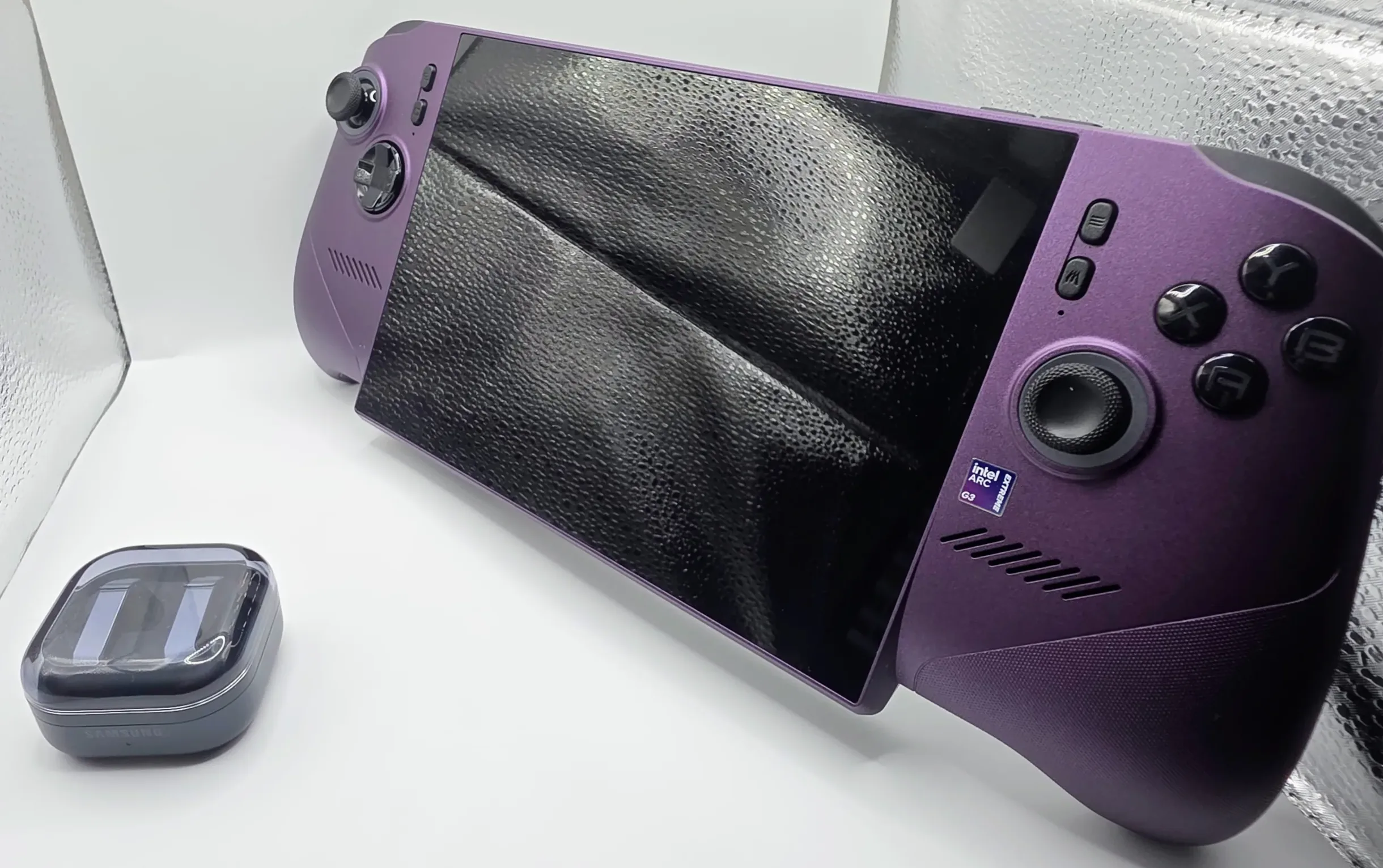
Intel’s equivalent is its own Mesa driver (ANV for Vulkan), and historically it has trailed RADV in the gaming-specific tuning that handhelds depend on. The hardware in the Arc G3 Extreme is ready for this; full Vulkan 1.4 support and upstreamed code are in place, but the polish that makes RDNA on SteamOS feel effortless takes the same kind of sustained, game-by-game optimization Valve and AMD have poured in over the years. That is the gap.
We asked Intel directly where this sits. The answer was candid: they have been working on the Linux experience as much as possible, are collaborating with Valve and upstream partners to improve it, and have nothing to announce at the moment. That is not a no, and the framing matters. Intel is actively engaged with Valve rather than leaving Linux to chance, which is the right posture for a part this capable. For Bazzite and SteamOS users specifically, the honest read today is that this is a Windows handheld first; native Linux gaming will run, but the frictionless, fully-tuned experience AMD enjoys is not here yet. The day Intel’s driver story matches its silicon, the Arc G3 Extreme becomes Intel’s greatest offering outright and a genuine shakeup for the whole market. The hardware is already there. We will be testing Bazzite on this device and will report the moment it is ready to recommend.
The Good
- Fastest x86 handheld at native 1200p, 43% faster on average vs prior Intel gen at 35W (BTR geomean)
- Class-leading performance-per-watt: 17W matches AMD’s 35W across 36 games
- IBC v3.5 P-core parking keeps framerates playable down to a 12W floor where prior Intel handhelds stalled
- Precompiled Shaders eliminates first-launch compilation stutter (avg 3x+ faster loads)
- Up to 11h 45m gameplay with Endurance Gaming in light titles
- Premium chassis: Hall Effect sticks, metal-dome D-pad, M.2 2280 slot, dual Thunderbolt 4
The Bad
- Pricing: $1,799, well above the $999 Ally X
- 785g is heavy for prolonged unpropped handheld sessions
- Endurance Gaming and XeSS frame generation cannot run at the same time
- Linux/SteamOS driver tuning still trails AMD; native Bazzite experience not there yet